
Want to export Zoho emails to PST format in batch? Then, you are on the right page. Many users are looking to switch from Zoho to Outlook and converting emails to PST format is the first step to accomplish it. In this guide, we will explain the reasons for migration, and share the best tool to get the error free results. So, let’s get started!
Zoho Mail is the popular email service provider for businesses all over the world. It offers email, hosting, integrated tools, contacts, calendars and many more. Still, there are many instances where users want to convert data to PST format. A PST also known as Personal Storage Table is a data file supported by Outlook to store emails and attachments, etc. It is easy to manage on local systems.
Common Reasons to Export Zoho Mail to PST
- For legal or compliance-related needs, you can export your data to PST format.
- Users can easily import Zoho emails into Microsoft Outlook.
- Saving Zoho emails as PST ensures you have a secure offline copy of your mailbox.
How to Convert Zoho Emails to PST Format Manually?
- Log in to your Zoho Mail account and enable IMAP.
- Open Outlook.
- Go to File >> Add Account and choose IMAP.
- Enter Zoho IMAP details and complete the account configuration.
- In Outlook, go to File>> Open & Export>> Import/Export.
- Select Export to a file>> Outlook Data File (.pst).
- Choose the Zoho mailbox folders, set a location, and click Finish.
Drawbacks of Manual Process
- Not suitable for large mailboxes
- Requires Outlook installation
- No batch export of multiple Zoho accounts
- Higher chances of missing emails or folder issues
- Time-consuming and complex for non-technical users
How to Export Zoho to PST Automatically?
Zoho Backup Tool is a straightforward solution to migrate Zoho emails to PST in a safe manner. It is designed for individuals and businesses both, so that they can easily convert their data with full integrity. Also, the tool efficiently exports multiple Zoho emails to PST file while maintaining the original folder structure. Apart from that, it is a versatile solution that allows users to migrate Zoho emails to various file formats and email clients. You can utilize its date-range filter to transfer the emails from a particular period of time.
Download the demo of the tool and test the working capabilities of the tool before buying it.

Steps to Convert Emails from Zoho to PST are:
- First download the tool and install it on your PC.
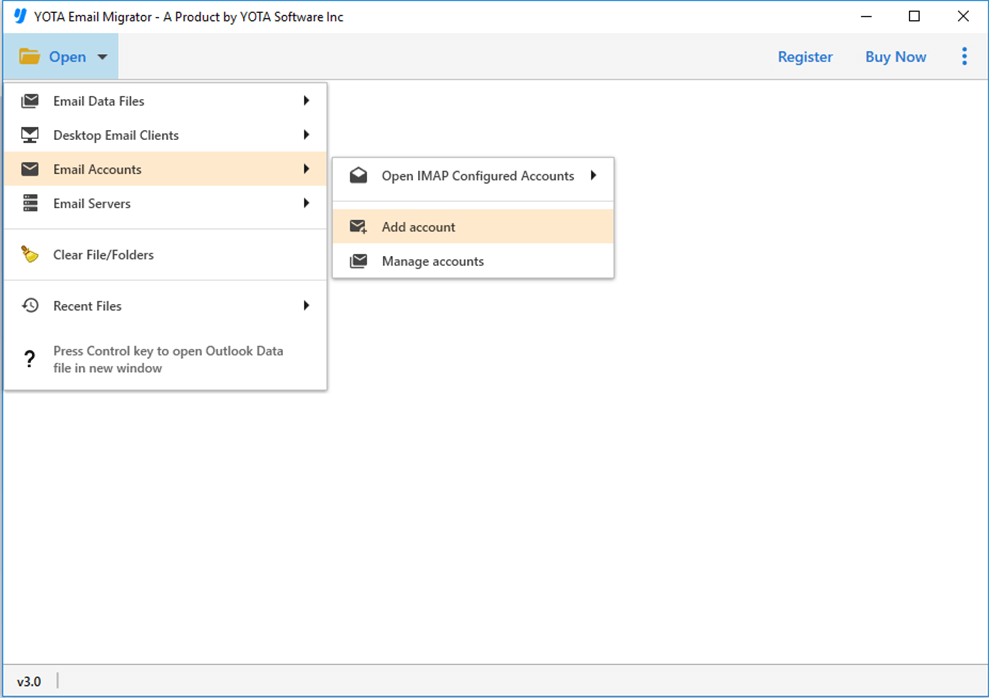
- Click on Open>> Email Accounts>> Add Accounts.
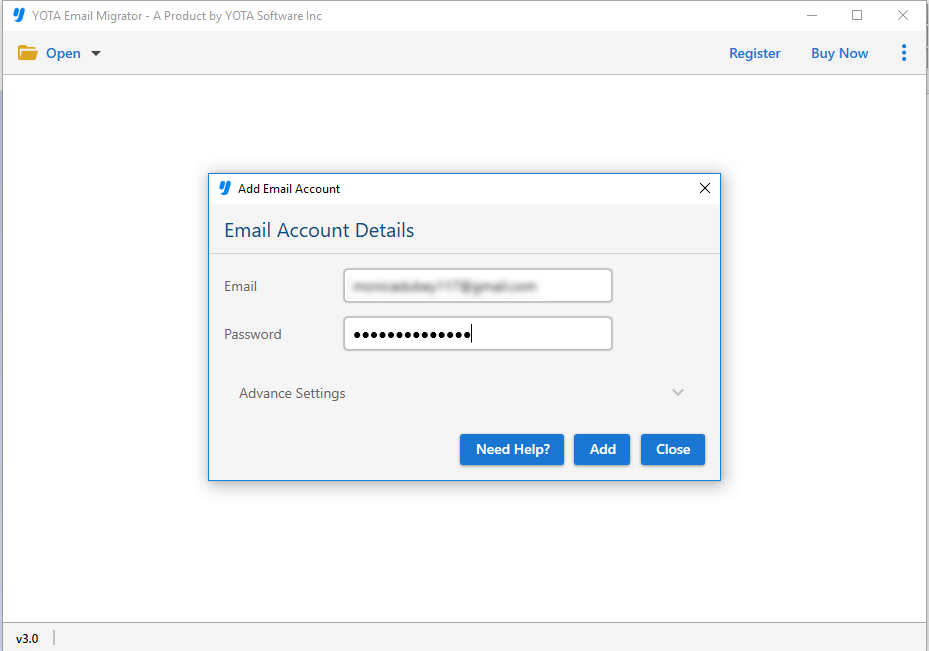
- Now, enter Zoho login credentials in to the panel.
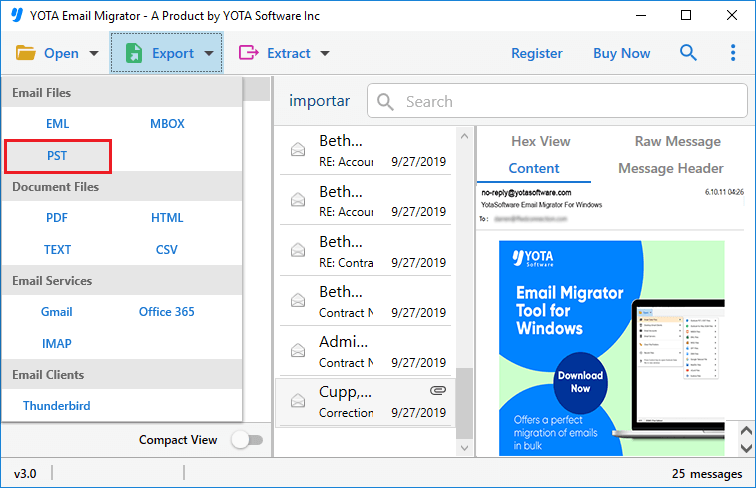
- Choose the required folders or emails to convert.
- Next, go to Export and select PST option from the drop-down menu.
- Browse the location and hit the Save button.
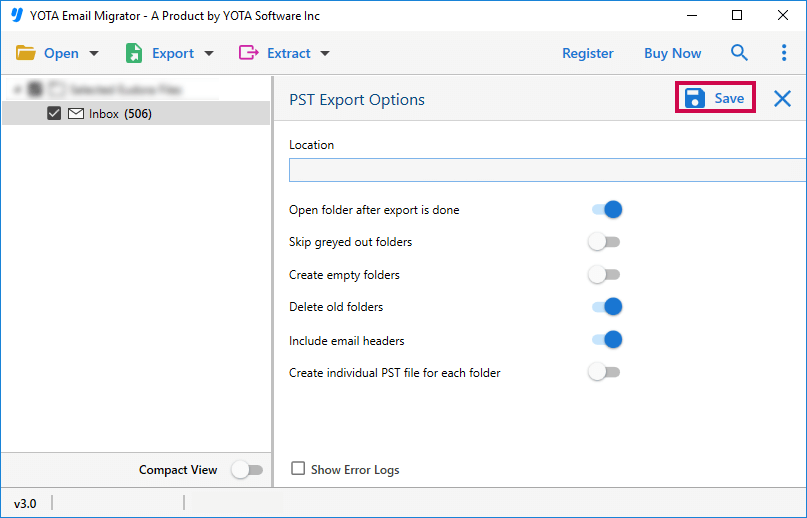
That’s it! In few easy clicks, you can export Zoho to PST with attachments.
Prime Features of the tool
- Download all emails from a Zoho Mail account without losing anything.
- Backup multiple Zoho emails at once using its bulk mode option.
- Save Zoho emails in PST format for easy offline access.
- Keeps the original folder hierarchy and email formatting intact.
- Maintains read and unread email status during conversion.
- Export emails within a specific date range using the date filter.
- Provides options to extract attachments and email addresses.
- Works smoothly on all Windows versions, including Windows 11.
Conclusion
Exporting Zoho to PST becomes necessary when you have to switch to MS Outlook or creating backups. But Zoho does not provide direct option for this conversion. In the above guide, we have shared two best methods to convert your mailbox. Although, the manual method is free, but it is slow, and complex. To eliminate the limitations, you can try the professional solution. It give you 100% accurate results while preserving meta elements and data integrity.