
Are you looking for an easy method to export Gmail to Zoho Mail? Or want to know how to upload Gmail mailbox data to your Zoho account? If so, then read this article completely. In this write-up, we explain how to import your Gmail mailbox data without requiring any technical knowledge. So, lets get started!
Gmail is a cloud-based email service used for personal and businesses across the world. It offers a clean interface and collaboration options with other Google apps. It also provides an excellent panel for sending and organizing emails across devices.
Although Gmail is powerful, yet many users are looking to move to business-oriented email hosting platforms such as Zoho Mail for better control and domain-based environment for their businesses.
Zoho Mail is a secure, ad-free, and privacy-focused email service designed for individuals, professionals, and organizations. It offers a robust interface, advanced collaboration features, and better data organization. And, it all make it the best choice among the business owners for work environments.
Reasons to Transfer Gmail Emails to Zoho Mail
- Zoho gives better control over business emails.
- It offers clean and ad-free email experience.
- You can manage emails, contacts, and tasks in one place.
- Zoho Mail works well with other Zoho business apps.
- It gives more storage and flexible plans for companies.
- It also supports custom domain for professional emails.
User Query: A few days ago, I decided to move my business emails to Zoho Mail. I am not aware of the steps to move Gmail emails to Zoho without losing anything. And also, I do not have technical expertise in email migration, so I was looking for a method that is simple and quick. Kindly suggest me an easy way to import Gmail into Zoho Mail with attachments.
— Bella, Romania
How to Transfer Gmail to Zoho Mail Automatically?
Try Gmail Backup Tool to transfer your data in easy manner. The software helps you to export emails, contacts, attachments, and other mailbox items directly from Gmail to Zoho. If you have thousands of emails to move, then you can use its bulk mode option to transfer all your data at once.
The tool comes with a simple, clean, and error-free interface. So that even non-technical users can easily operate the tool. It also provides advanced email filter options that will help you to migrate only the required emails. You do not need any additional software. All you need to enter your Gmail and Zoho login credentials to start the process.

Steps to Move from Gmail to Zoho Mail Account are:
- Launch the software on your Windows PC.
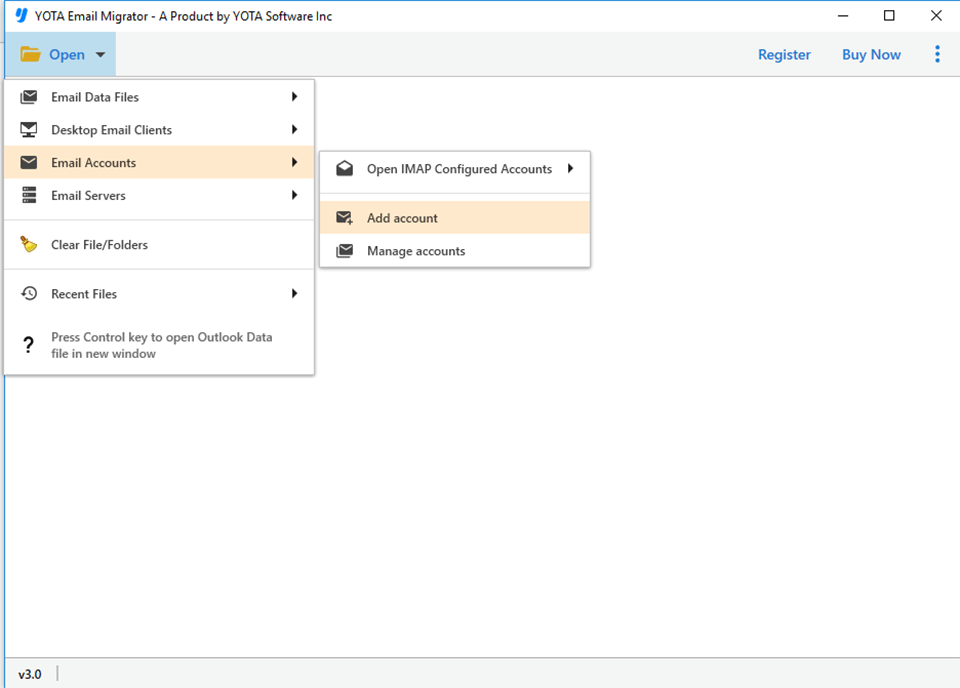
- Click on Open>> Email Accounts>> Add Account.
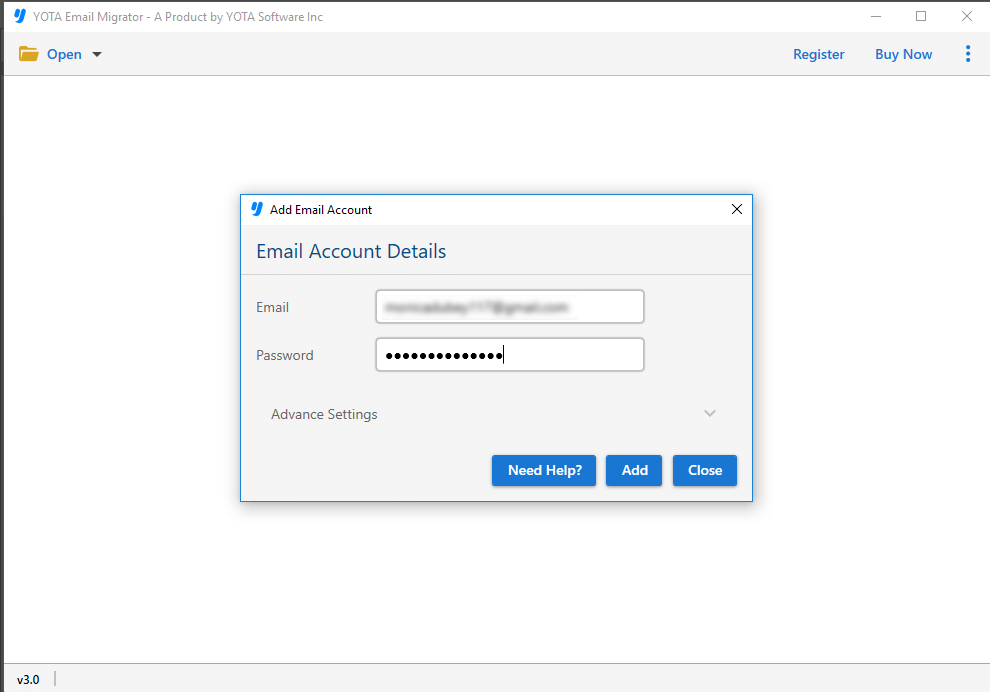
- Add your Gmail account using the login credentials.
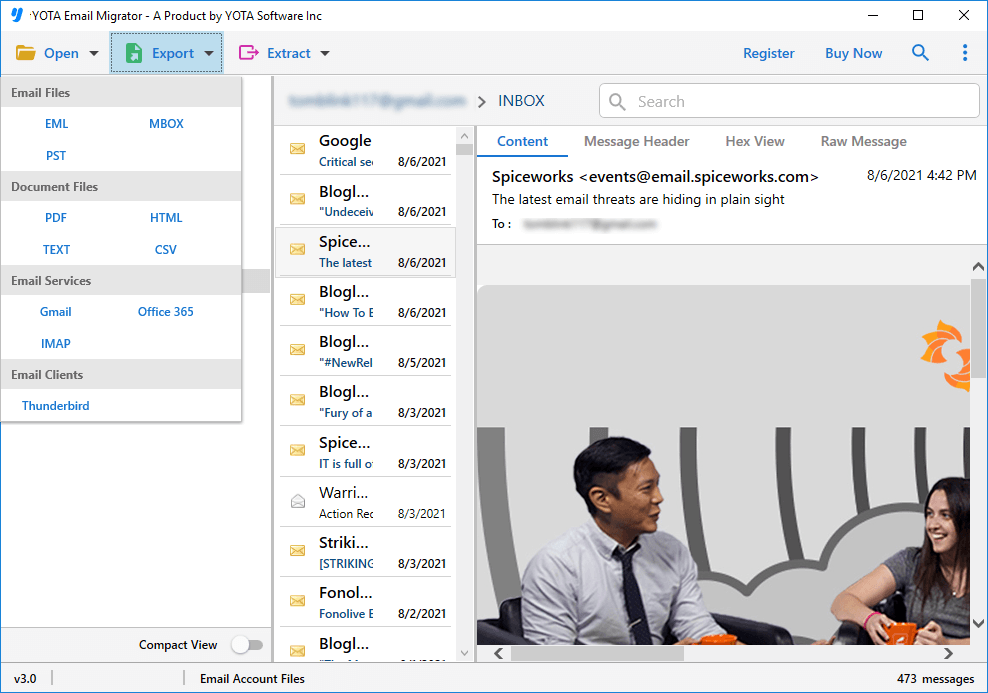
- Choose the required Gmail folders from the list.
- Go to Export and select IMAP from the saving option.
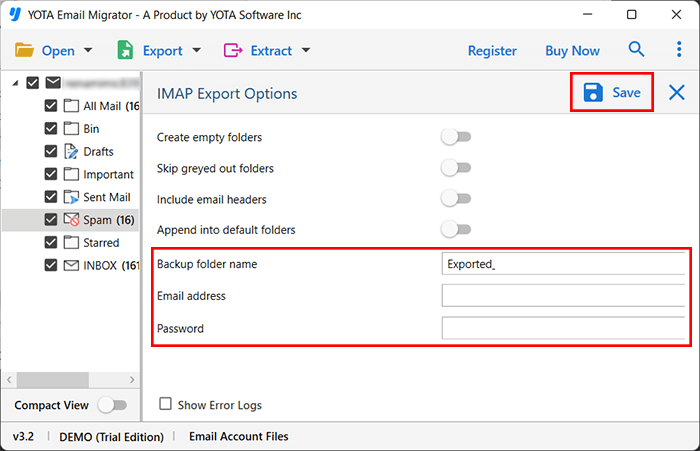
- Enter Zoho account credentials. Hit the Save button.
Prime Features and Benefits of the Professional Software
This application provides an excellent features to migrate Gmail mailbox items directly to Zoho Mail. Some major features are:
- Easy-to-use interface, ideal for non-technical users.
- Only requires Zoho Mail account credentials.
- Fully automated working with no technical steps.
- Preserves the complete folder hierarchy during migration.
- Ability to load Gmail folders directly from the server.
- Maintains email integrity and metadata properties accurately.
- Does not require any manual extraction or downloading of Gmail data.
- Compatible with all Windows OS including Win 11, 10, 8.1, 8, 7, XP, etc.
Conclusion
In this article, we have discussed a complete procedure to convert Gmail to Zoho Mail. This helps users easily import emails, contacts, and calendar data to their Zoho accounts quickly and instantly. The step-by-step working of the tool and its benefits are also explained above. We hope this article helps you resolve the Gmail to Zoho Mail migration issue effectively.